Freight forwarding SME operations are the daily workflows that help small and medium-sized forwarders manage customers, shipments, services, quotations, booking, costs, invoices, and reports. The keyword “freight forwarding SME operations cho doanh nghiệp” refers to the operating system a forwarding business needs when Excel, email, and chat groups no longer keep job data clear. In freight forwarding, a small team may handle many roles at once: sales, documentation, operations, pricing, and accounting. This article explains what freight forwarding SME operations should track and how Apollogix FMS supports those workflows.
What Are Freight Forwarding SME Operations?
Freight forwarding SME operations are the connected tasks that move a shipment from customer request to job completion, billing, and reporting. SME means small and medium-sized enterprise. In a forwarding company, SME operations usually include client management, quotation, booking, shipment creation, service tracking, job order control, cost recording, invoice preparation, and management reporting.
The challenge is not only shipment volume. The challenge is that each job contains many related records. One customer request can become a quotation, a booking, a Job Order, a shipment, several service items, multiple cost lines, and one or more invoices. If those records are handled in different files, the team may lose the connection between what was sold, what was operated, and what was billed.
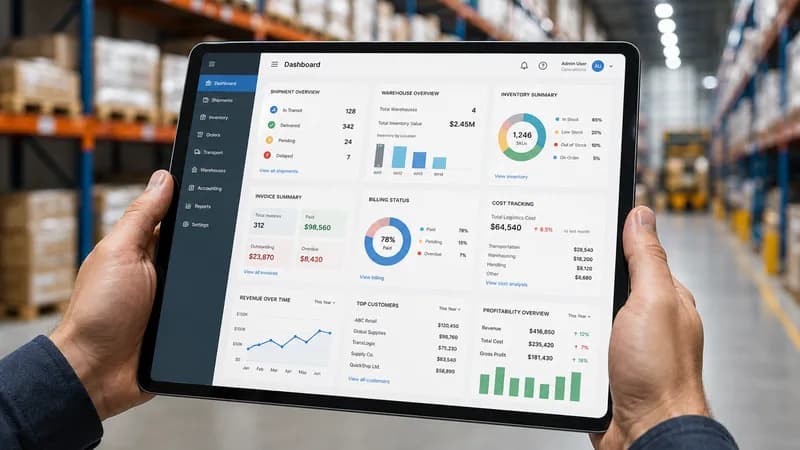
Apollogix FMS, or Freight Management System, supports this workflow through modules such as Client, Ocean Freight, Air Freight, Service, Sales, Job Order, Pricing, Accounting, Spend Money Request, Report, Library, Staff, System Settings, and Administration. For freight forwarding SME operations, the main value is keeping job data structured across departments.
Why Do SME Forwarders Lose Control When Operations Stay Manual?
SME forwarders lose control when operations stay manual because job information changes faster than spreadsheets can reflect. A shipment may start with a sales quotation, move into a booking, require document handling, involve customs or trucking service, and then pass to accounting for invoice and payment tracking. Each step changes the job record.
Manual work becomes risky when the team grows beyond one or two people. Sales may keep customer notes in one place. Documentation may manage shipment numbers and house bills in another place. Operations may track service status through chat messages. Accounting may wait for cost confirmation before issuing an invoice. Management may only see the problem when the customer asks for an update or when the profit report does not match the expected result.
This is why freight forwarding SME operations need a shared workflow. A shared workflow does not mean every department does the same work. It means each department updates its own part of the job while the full record remains connected. The company can then see the customer, shipment, service, cost, invoice, and report data from the same operating structure.
What Should Freight Forwarding SME Operations Track First?
Freight forwarding SME operations should first track client data, shipment data, service items, quotation records, job order status, booking details, costs, invoices, and reports. These are the records that decide whether a forwarding job can move from request to completion without losing context.
Client data is the starting point. The system should store customers, vendors, agents, and other partners in one database. It should also store legal information, contact details, client types, and the salesperson responsible for the account. This matters because the same client record can be used when creating Quotation, Job Order, Shipment, and Accounting records.
Shipment data is the next control point. A forwarder needs to manage shipment number, Consol number, Job Order connection, Incoterm, house bill, delivery mode, loading and discharge information, consignor, consignee, notify party, receivables, and status. For air freight, the system should also support MAWB, HAWB, airline, flight number, ETD, and ETA.
Service items are also important. A forwarding job may include customs, trucking, handling, or other services. Each service should show what needs to be done, who performs it, when it happens, and which cost or selling price applies.
How Does FMS Connect Sales, Pricing, and Job Order?
FMS connects sales, pricing, and job order by turning commercial data into operational records that other departments can use. In manual workflows, sales may send a quotation, pricing may keep the buying rate separately, and operations may create the job again from email instructions. That creates duplicate entry and weak handover.
In Apollogix FMS, Sales can manage quotation records by customer and freight mode. A quotation can include Ocean or Air mode, Import or Export direction, Incoterm, payment term, freight charges, local charges, total amount, and currency. This creates a structured commercial record instead of a loose email or PDF.
Job Order then becomes the operating record for the approved work. A Job Order can be created from a quotation or booking. It can store customer, route, shipment type, status, and links to Shipment, Service, and Accounting. This connection helps the company follow the job from sales handover to operational execution.
Pricing adds another layer of control. Costing Rate helps manage buying rates by route, carrier, and container type. When pricing information connects with job and shipment data, the team can review whether the expected cost and selling price remain aligned during execution.
How Should Accounting and Reports Support SME Operations?
Accounting and reports should support SME operations by connecting job activity with revenue, cost, receivables, payables, and profit visibility. In freight forwarding, accounting should not start only after the shipment is finished. It needs access to job, shipment, and service records so invoice and cost data can be prepared from the actual operating workflow.
Apollogix FMS supports invoice creation from Job, Shipment, and Service. It also supports Account Receivable, Account Payable, customer and partner debt tracking, revenue and cost by job, COA-related cash flow, MISA connection for VAT invoice, and non-shipment overhead items. This matters for SME forwarders because accounting errors often come from missing job context, not only from calculation mistakes.
Reports complete the workflow. A forwarder needs to review shipment volume by period, revenue by customer, route, or sales, profit by job or shipment, Ocean and Air structure, and Excel or PDF exports. These reports help management see the operating picture without manually asking each department to rebuild data.
For freight forwarding SME operations, reporting should not be a separate task at the end of the month. It should reuse the records that sales, operations, documentation, pricing, and accounting already update during daily work.
Which SME Forwarders Need FMS Most?
SME forwarders need FMS most when job handover depends on people remembering details instead of the system preserving records. A new forwarding company may begin with spreadsheets because the team is small and the number of jobs is limited. This can work for a short period when one person understands the full story of each shipment.
The problem appears when job volume increases or when responsibilities split across departments. Sales needs quotation control. Documentation needs shipment and bill data. Operations needs service status. Pricing needs buying rates and booking information. Accounting needs invoice, receivable, payable, and cost records. Management needs reports that do not take days to prepare.
FMS becomes useful when the company wants the job record to survive every handover. The system should show who the customer is, what was quoted, what was booked, which shipment or service is being handled, which costs have been recorded, which invoices have been created, and which reports can be exported.
For SME forwarders, the decision is not only about buying software. It is about deciding whether the business can keep growing while each department still works from disconnected files.