What Is Workflow in Logistics?
Workflow is the structured sequence of tasks, approvals, updates, and handovers that moves a logistics job from request to completion.
In logistics, a workflow may start from a customer inquiry, quotation, booking, transport job, shipment, service request, or invoice. Each step depends on the right person, the right data, and the right timing.
Why Workflow Is More Than a Task List
A task list only shows what needs to be done. A workflow shows who owns each step, what data is required, what status should change, and what happens next.
For a freight forwarding team, this may include quotation creation, job approval, shipment setup, container tracking, cost entry, invoice creation, and report review. For a transport team, it may include job creation, trip planning, driver allocation, proof of delivery, waiting time tracking, and accounting handover.
A clear workflow helps managers see where work is moving, where it is blocked, and which department needs to act.
Why Logistics Workflow Matters for Operations Teams
Logistics workflow matters because delays usually happen between departments, not only inside one department.
A quotation may be accepted but not converted into a job. A shipment may be created but missing cost data. A container may be delivered but proof of delivery is not updated. An invoice may wait because the operation team has not confirmed the final charges.
The Cost of Unclear Workflow
When workflow is unclear, teams rely on messages, calls, and spreadsheet-based tracking. This creates three common problems.
First, responsibility becomes unclear. A job can sit in draft status because no one knows who should approve it.
Second, data becomes inconsistent. Sales, operations, and accounting may each keep their own version of the job.
Third, reporting becomes late. Managers cannot see shipment status, job profit, transport cost, or pending invoice status at the right time.
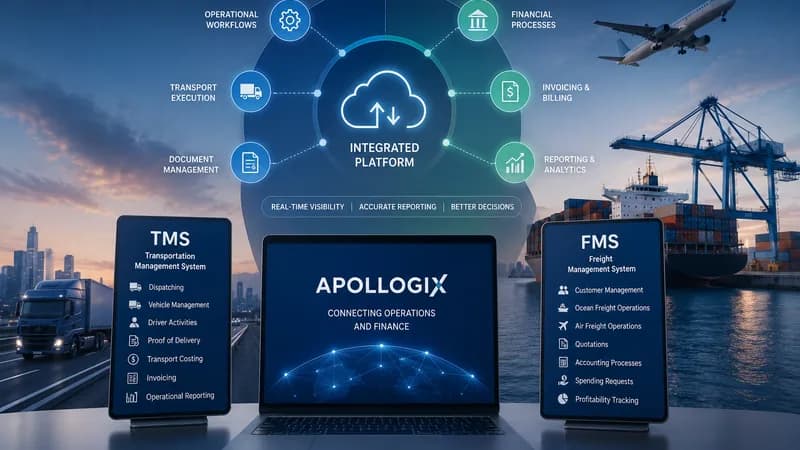
In Apollogix FMS, workflow connects modules such as Client, Quotation, Job Order, Shipment, Service, Accounting, Spend Money Request, and Report. In Apollogix TMS, workflow connects Client, Transport Job, Operation, Rate Management, Equipment, Driver App, Accounting, and Report.

How a Logistics Workflow Usually Works
A logistics workflow usually follows a chain of request, confirmation, operation, cost control, billing, and reporting.
Each business may have a different process, but the operating logic is similar. The company receives a request, confirms the service scope, assigns teams, tracks execution, records cost, issues invoice, and reviews performance.
Example Workflow for Freight Forwarding
In freight forwarding, a workflow may begin when Sales creates a quotation for an Ocean Freight or Air Freight shipment. Once the customer confirms, the team creates a Job Order. From there, documentation and operations can create Consol, Shipment, Container, Service, and related cost records.
The Accounting team then uses the confirmed job, shipment, and service data to create invoices, track receivables, manage payables, and review profit by job.
This workflow reduces repeated data entry because each module inherits information from the previous step. It also gives managers a clearer view of the job from quotation to accounting.
Example Workflow for Transport Operations
In transport operations, a workflow may begin with a Transport Job. The operations team creates container routing, plans trips by schedule date, allocates drivers and equipment, monitors trip progress, and reviews proof of delivery.
If waiting time, faulty equipment, or maintenance issues appear, the system records these events inside the operational flow. Accounting can then calculate revenue, transport cost, additional charges, and payment status based on confirmed data.
What a Good Workflow System Should Show
A good workflow system should show status, ownership, timing, cost impact, and the next required action.
Managers should not need to ask every department for updates. The system should show which jobs are new, active, pending, delayed, or closed. It should also show whether the next action belongs to Sales, Operations, Documentation, Pricing, Accounting, Driver, Workshop, or Admin.
Workflow Visibility for Managers
Workflow visibility helps managers answer practical questions.
Which jobs are still in draft status? Which containers are waiting for allocation? Which trips have exceeded waiting time? Which invoices are not ready because operational data is missing? Which shipments have cost but no billing yet?
This visibility is important for COO and CFO teams. The COO needs to protect service performance. The CFO needs to understand whether logistics profit is real after all costs are recorded.
Apollogix supports this through dashboards, notifications, role-based access, reports, job status, transport status, accounting status, and operational records across freight forwarding and transport workflows.

How Apollogix Supports Logistics Workflow Control
Apollogix supports workflow control by connecting operational data across teams instead of leaving each department to manage separate records.
For freight forwarding teams, Apollogix FMS means Freight Management System. It helps manage customer and partner data, Ocean Freight, Air Freight, Service, Sales, Job Order, Pricing, Accounting, Spend Money Request, Report, Library, Staff, System Settings, and Administration.
For transport teams, Apollogix TMS means Transportation Management System. It helps manage dashboards, clients, transport jobs, operations, rate management, equipment, accounting, reports, system settings, and user permissions.
Where Workflow Becomes Easier to Control
Workflow becomes easier to control when each team works from the same job data.
Sales can create quotations and job orders. Operations can manage shipments, containers, trips, routing, and service progress. Accounting can create invoices and track receivables or payables from confirmed job data. Managers can review reports without waiting for manual consolidation.
This structure does not remove human judgment. It gives each team a clearer operating path, so decisions are based on the latest status instead of scattered updates.